1.Search for the quote to duplicate by either:
▪Clicking View/Edit Quote on the ribbon, or
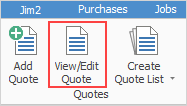
▪Clicking the Create Quote List icon on the ribbon and use the search criteria to narrow the choices. Select the quote to duplicate from the search result.

2.Click Create Similar in the Quote footer.
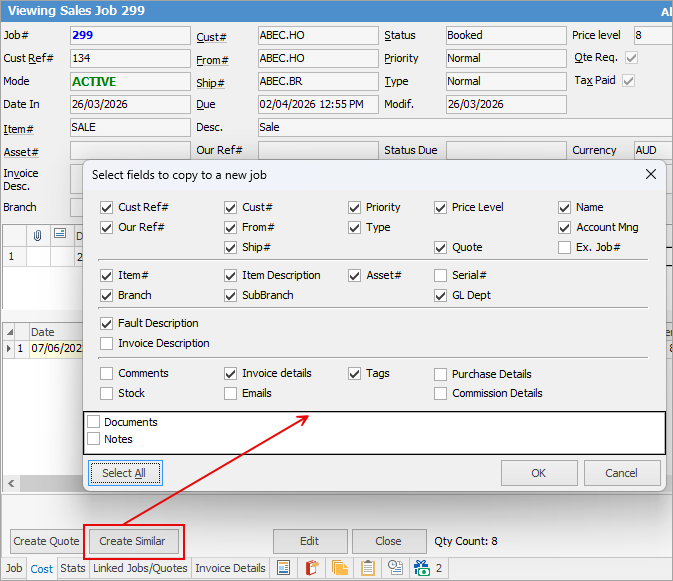
3.The above screen will appear. Choose which fields of the quote are to be duplicated on the next quote and click OK.
|
Select All will exactly duplicate the fields from the chosen quote – with the exception of the Quote# (a unique number for every quote is automatically generated by Jim2, regardless of how a quote is being added), Status and Time/Date/Initial fields. |

4.A new quote will appear that will be similar to the first. Edit the quote fields as normal.
|
In Edit mode Create Similar will automatically save and close the original quote and create a duplicate. In View mode Create Similar will keep the quote open and create a duplicate, ready to edit. Cancel Similar will abort the adding of the new quote (without effecting the original). |
|
In a multi user environment where others could be adding quotes at the same time, it is a function of Jim2 to monitor the sequence of unique quote numbers issued at all times. If a Cancel Similar is nominated by one user, and another user has the next sequential quote number already, the obsolete quote number automatically has a system status of Cancel to ensure the integrity of the database. This is different to a user selecting a quote status of Cancel. |
Further information
Create a Template for Recurring Quotes