
Composing and sending an email in Jim2 will be a familiar experience for anyone who has written an email before.
The following keyboard shortcuts are available:
Shortcut |
Description |
|---|---|
Ctrl + Enter |
Send Email. |
Ctrl + Delete or 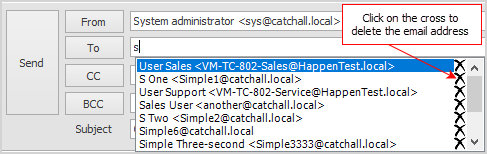 |
Delete memorised email address when in the To: field, or Highlight the incorrect email address in the To: drop down list and select the |
Ctrl+Alt+ Mouse Scroll Wheel |
Change the size of the view in the body. |
 to remove it.
When entering an email address in the To:, CC:, or BCC:, fields, Jim2 will suggest email addresses to use. These drop downs will show email addresses related to the job first, including Customer, Account Manager, From and Ship.
 |
Note: If you start typing in these fields, Jim2 will show those email addresses, however, you will also see other email addresses that you have recently used. To show only addresses for that customer, etc. use the drop down arrow at the end of each field to bring up the email addresses. |
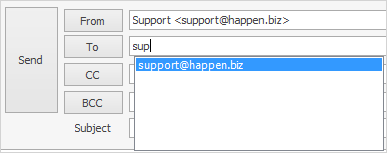
The drop down options in From: will show what email accounts this email can be sent from. By default, the Jim2 user's email address will be selected (as set up on the user cardfile), unless there is an Email Editor Rule in place. Addresses can also be chosen as set up in Tools > Setups > Email Accounts. The address used in the From: signals to JES how to send the email: via the SMTP server as defined in setups, or it will fall back to the defaults in Email Options. When you enter email addresses in the To field, Jim2 will start to remember these entries.
Further information
Create a Job, PO or Quote from Email
Delete an Incorrect Email Address
Diagnosing Incoming Email Issues
Diagnosing Outbound Email Issues