|
There may be times where a word has been added to the Jim2 dictionary which has been misspelt, or is no longer ne3ded.
Within an email where the word appears, select ABC Spelling.
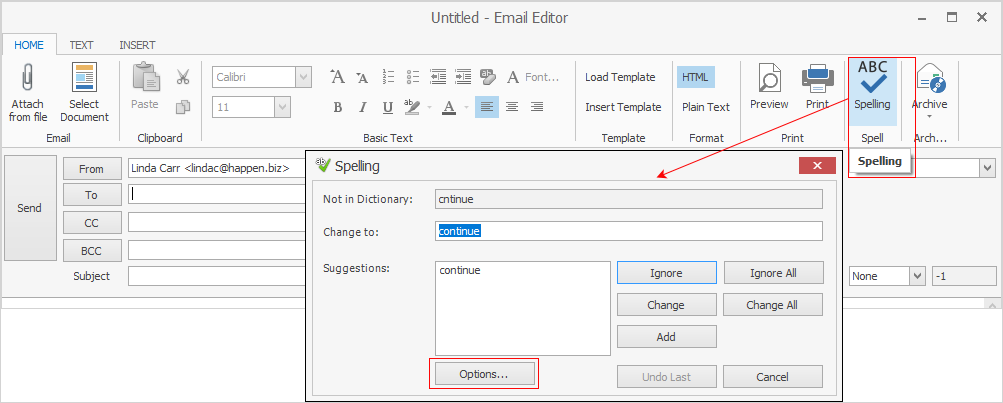
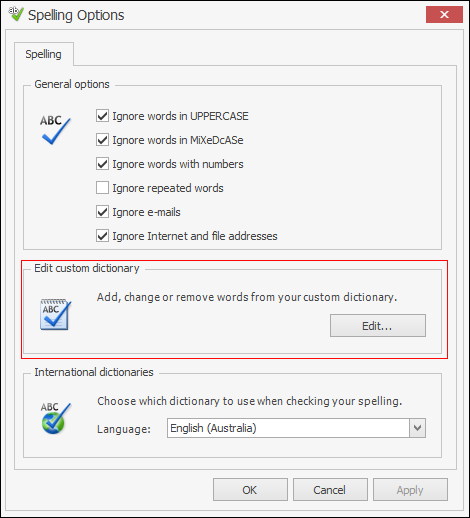
Go to the Options tab and select Edit Custom Dictionary.
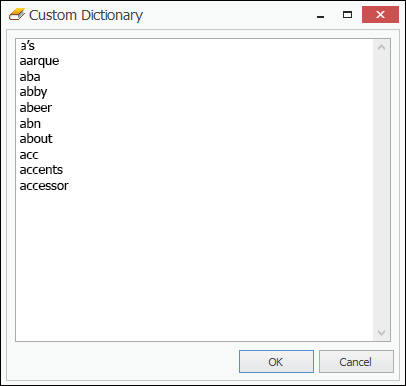
This is will bring up the list of all custom words that have been added. Change, delete or add words (by scrolling to the bottom of the list) in this area.
|
|
Changes made will be updated for all users.
|
Further information
Email Overview
Before You begin
Email Lists
Email Rules
Email Templates
Email Editor Rules
Email Archiving
Email Security: Overview
Email Tags
CardFiles and Emails
Email Editor Functions
Email Macros
Email Macros Syntax
Email Preview Pane
Add Email Folders and Tags
Email Tokens
Attach Documents to Email
Compose and Send Emails
Create a Job, PO or Quote from Email
Create a Link Within an Email
Drag and Drop Email to Job
Delete an Incorrect Email Address
Delete Multiple Emails
Diagnosing Incoming Email Issues
Diagnosing Outbound Email Issues
Email in Bulk from a List
Email to Multiple Contacts
Failed Emails
Find Missing Emails in Jim2
How Email 'From' Works
Link an Email to Job, PO, Quote, etc.
Other Email Functions
Out of Office Message
Send and Receive Emails
SMS via Email
|