Delete Multiple Emails

Back Top Prev Next Print

Email lists support standard Windows multi-select for moving, tagging and deleting etc.


Select all (Ctrl A), then right click and select Delete (or Purge [delete forever] from the System Deleted folder).
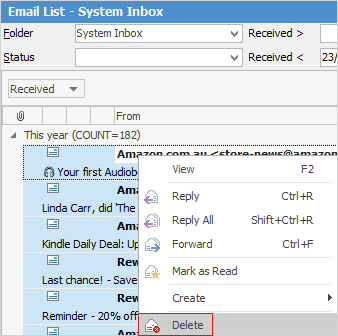
 

deletemultipleemails


When deleting multiple emails, these will be logged via History individually.


Further information

Email Overview

Before You begin

Email Lists

Email Rules

Email Templates

Email Editor Rules

Email Archiving

Email Security: Overview

Email Tags

CardFiles and Emails

Email Editor Functions

Email Macros

Email Macros Syntax

Email Preview Pane

Add Email Folders and Tags

Email Tokens

Attach Documents to Email

Compose and Send Emails

Create a Job, PO or Quote from Email

Create a Link Within an Email

Drag and Drop Email to Job

Delete an Incorrect Email Address

Diagnosing Incoming Email Issues

Diagnosing Outbound Email Issues

Edit Dictionary

Email in Bulk from a List

Email to Multiple Contacts

Failed Emails

Find Missing Emails in Jim2

How Email 'From' Works

Link an Email to Job, PO, Quote, etc.

Other Email Functions

Out of Office Message

Send and Receive Emails

SMS via Email