|
Please see Overview for an explanation of Contract lists.
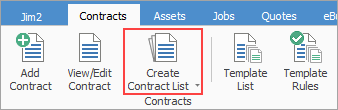
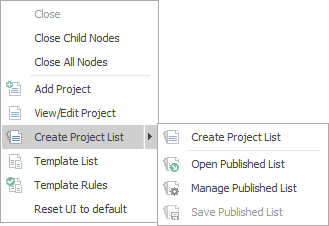
On the ribbon, go to Contracts > Create Contract List.

|
Note: If the Create Contract List icon is greyed out there are two reasons for this:
1.Jim2 only allows 25 lists per object. If there are already 25 lists in the Nav Tree, a list will need to be closed to allow creation of a new list.
2.The user's security does not allow them to create the list. |
See here for information on the use of the Reset button.
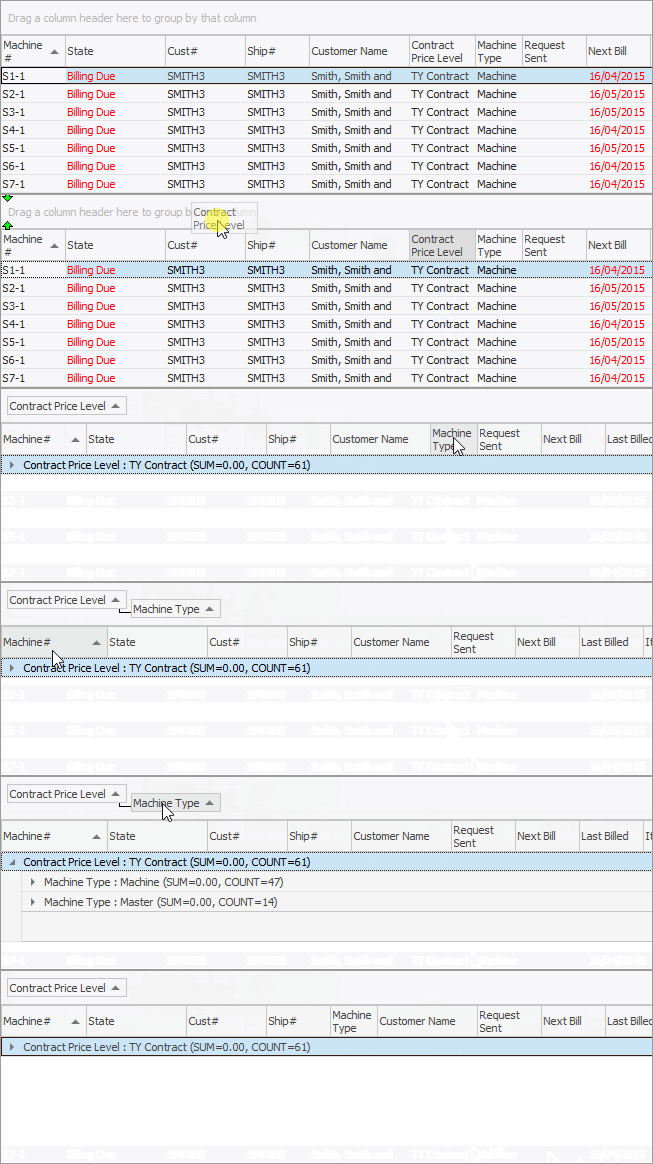
Sorting, searching and grouping are available as per other lists in Jim2. Select the column header in the grid to sort, then drag it to the Group By area to group.

|
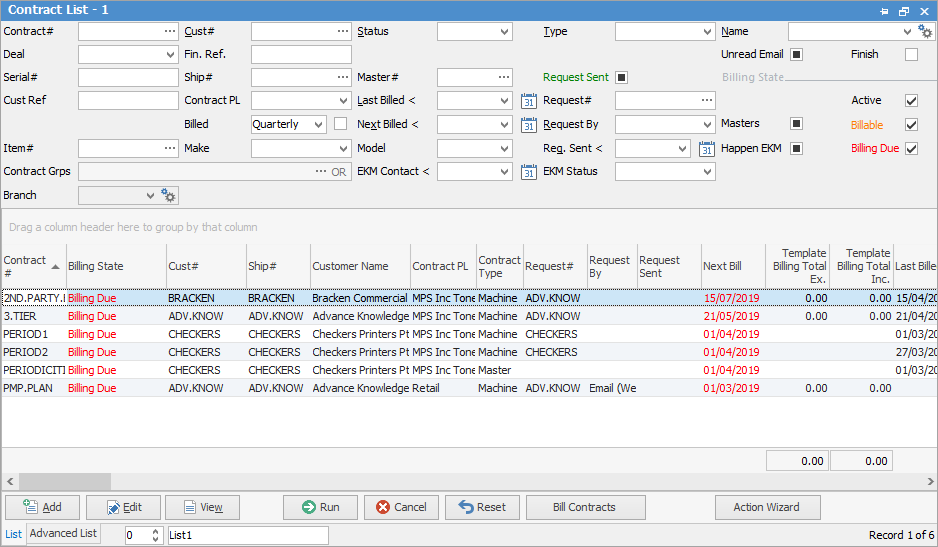
Some letters in the field names within the header are underlined, eg. Cust#. Using Alt+ the underlined letter will jump to the field beside that heading.
|
|
|
|
Contract#
|
Enter a contract number here to return a list for that number only, or leave it blank to run a full list of contracts.
|
Cust#
|
Entering a customer card code here will display a list of all contracts for that customer.
|
Status
|
Choosing a status will display a list of all contracts on that status.
|
Type
|
Refine the list to show only master contracts, or child contracts (Contract type), etc.
|
Name
|
Produces a list of all contracts for the name entered here.
|
Deal
|
Used for finance brokers. Entering a Deal number here will produce a list of all contracts with that Deal number.
|
Fin. Ref
|
Adding a Fin. Ref here will produce a list of all contracts with that reference.
|
Unread Email/Finish
|
Ticked will show all (unread email/finished contracts), unticked will show none, solid black box will show everything.
|
Serial#
|
Entering a serial number will produce the contract with that serial number only.
|
Ship#
|
Enter a Ship cardfile here to see all contracts for that cardfile.
|
Master#
|
Entering a master contract number will list the master and child contracts for that master number.
|
Request Sent
|
Ticked will show all contracts where a meter request has been sent.
|
Cust Ref
|
Produces a list of all contracts using this customer reference.
|
Contract PL
|
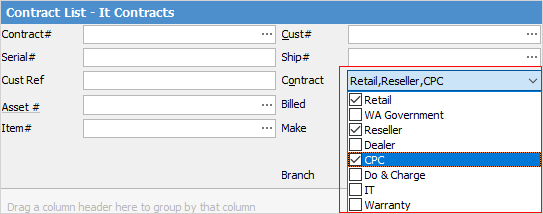
Produces a list for all contracts of this contract type, ie. Retail.
Note: More than one can be selected if required.
|
Last Billed <
|
Produces a list of all contracts last billed prior to the date entered here.
|
Request #
|
Enter a cardfile here to see all contracts where the Request is that cardfile.
|
Has Reads
|
Tick to see all contracts that have reads against them.
|
Asset #
|
Enter an Asset number to return a list of all contracts for that Asset.
|
Billed
|
Produces a list of all contracts billed based on the period selected here. Choices are: monthly, quarterly, biannually, annually, manual, 2 monthly, 2 yearly, 3 yearly, weekly, fortnightly, four monthly, 4 yearly and 5 yearly.
|
Billed Checkbox
|
This changes the behaviour of the filter to apply as follows:
▪Ticked will be based on next billing frequency or to filter based on the Project containing a meter/template which has this billing frequency.
▪Solid black box is based on the contract header billing frequency.
▪Unticked means any meter setups or templates containing this billing frequency. |
Next Billed <
|
Produces a list of all contracts with their next bill date due prior to the date entered here
|
Request By
|
Produces a list of all contracts using the Request By method selected here, ie. email, fax, etc.
|
Masters
|
Tick to produce a list of master machines based on the choices to the right.
|
Item#
|
Produces a list of all contracts using this Item.
|
Make/Model
|
Produces a list of contracts using this Item make and/or model.
|
Req. Sent <
|
Enter a date prior to which the request was sent to produce a list of all contracts with dates prior.
|
Happen EKM checkbox
|
Ticked will produce a list of contracts under Happen EKM.
|
Contract Grps
|
Selecting groups here will produce a list of contracts for those groups only.
|
EKM Contact <
|
A date can be selected here. See Happen EKM for more information.
|
EKM Status
|
Selecting an EKM Status will produce a list of devices with this status.
|
Bill Using
|
Default Read – This is the default as set up on an Asset in the Request By field.
Default Read (including Manual) – This allows for using the default as set up on an Asset, but also includes any manual reads entered.
Best Read – This will take the best read based on settings in Tools > Options > Contracts > Managed Print Services.
The default choice can be set up in Tools > Options > Contract > Managed Print Services, but can be changed at object level.
|
Frequency Fields
|
The Active, Billable and Billing Due frequency fields change the behaviour of the Billed filter. This enables the user to apply the filter to either the header or next billing frequency, or to filter based on the contract containing a meter/template which has this billing frequency.
|
Active
|
Produces a list of all active contracts.
|
Billable
|
Returns a list of all contracts where the current date is less than the Project's Next Bill date, but is within the billing window as set up via Tools > Options > Contract > Managed Print Services (Meter Read entry period), however this can be overridden on a connector basis. The billing window allows for contracts to be billed prior to their next bill date, but not too early. Text will be coloured orange.. This allows right clicking in the list to bill all jobs in the list, or select individual jobs to bill. It is not possible to preview when billing from a Job List. No child jobs are created – only master jobs. If a child is found with no master, it will only add the read to the Asset – it won’t create a job.
|
Billing Due
|
Tick this to return a list of all contracts with billing due.
|
Branch
|
Select a branch here, if branches are being used.
|
|
|
|
Item Grps
|
Selecting groups here will produce a list of contracts for those groups only.
|
Source
|
This field allows selection of the source for the meter reads.
|
Source Value
|
Enter a value here to filter your list by that value.
|
Var. Status
|
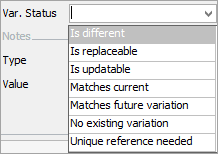
Select from the following options to filter the list:
|
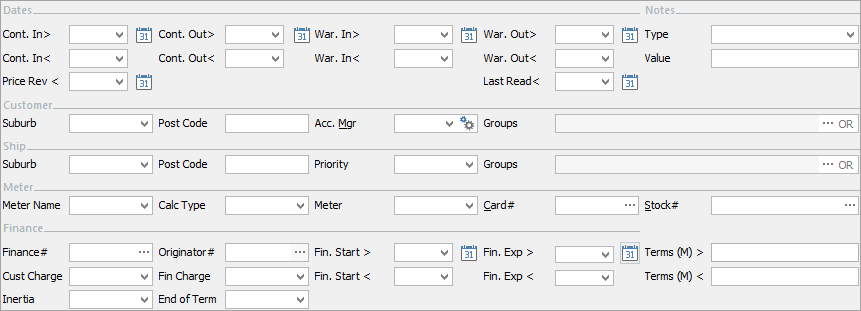
Cont.In >
|
Enter a contract start date after a specific date.
|
Cont. Out >
|
Enter a contract finish date after a specific date.
|
War. In >
|
Enter a warranty start date after a specific date.
|
War. Out >
|
Enter a warranty finish date after a specific date.
|
Cont. In <
|
Enter a contract start date prior to a specific date.
|
Cont. Out <
|
Enter a contract finish date prior to a specific date.
|
War. In <
|
Enter a warranty start date prior to a specific date.
|
War. Out <
|
Enter a warranty finish date prior to a specific date.
|
Type
|
Select a Note type.
|
Value
|
Enter a value here to further filter the list.
|
Price Rev <
|
This can be used to set when pricing was reviewed, or when pricing is to be reviewed.
|
Last Read <
|
This will produce a list of contracts with last reads before this date.
|
Customer Suburb
|
Enter the Customer suburb.
|
Customer Postcode
|
Enter the Customer postcode.
|
Customer Acc. Mgr
|
Select the Customer Account Manager.
|
Groups
|
Select CardFile group to search within.
|
Ship Suburb
|
Enter the Ship suburb.
|
Ship Postcode
|
Enter the Ship postcode.
|
Priority
|
Select a Priority here, if required.
|
Groups
|
Select CardFile group to search within.
|
Meter Name
|
Enter meter name (Managed Print Services only).
|
Calc Type
|
Select a calculation type to filter the list.
|
Meter Type
|
Enter meter type (if applicable).
|
Card#
|
Enter card code related to meter.
|
Stock#
|
Enter stock code related to meter.
|
The following only pertains to those using Finance in Jim2
|
Finance#
|
The cardfile for Finance contracts.
|
Originator #
|
The cardfile of the originator for the finance contracts, ie. the dealer who organised the finance.
|
Fin. Start >
|
Enter a start date here to see contracts started after this date.
|
Fin. Exp >
|
Enter an expiry date here to see contracts expiring after this date.
|
Terms (M) >
|
Enter a value here for terms after this date.
|
Cust Charge
|
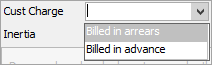
Choose from the following options to filter the list:
|
Fin Charge
|
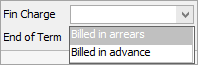
Choose from the following options to filter the list:
|
Fin. Start <
|
Enter a start date here to see contracts started before this date.
|
Fin. Exp <
|
Enter an expiry date here to see contracts expiring before this date.
|
Terms (M) <
|
Enter a value here for terms after this date.
|
Inertia
|
Inertia relates to the time after a rental contract has finished.
|
End of Term
|
Select an end of term to see all contracts at end of term.
|
|
Refer to Lists for details on sorting, naming, grouping, etc. The headings may not be strictly in this order.
|
|
|
Contract#
|
Contract number.
|
Billing State
|
Displays where the contract is up to, ie. Active, Billing Due, etc. Any text coloured red means that an action is required.
|
|
|
Active
|
This means the contract has been billed for the last period and a new bill is not yet due.
|
Billable
|
This means that a read has been received within the window as set up in Tools > Options > Contract Managed Print Services (Meter Read entry period), and can be billed.
|
Billing Due
|
This means that billing is due for this contract.
|
Request Sent
|
This means a meter read request has been emailed to the customer.
|
|
Cust#
|
Customer card code.
|
Ship#
|
Ship card code.
|
Customer Name
|
Customer name.
|
Contract Price Level
|
Displays the price level for the contract, as set up in Price Levels.
|
Contract Type
|
Displays the type of contract, as set up in Contract Types.
|
Request #
|
Displays the cardfile associated.
|
Request By
|
Displays the request by method.
|
Request Sent
|
This field is updated when a meter read request is sent.
|
Next Bill
|
Displays the next bill due date. Any text coloured red means that an action is required.
|
Template Billing Total Ex.
|
The figure shown here is the amount of the next billing action due ex GST.
Note: if there is more than one billing action, the amount shown here will be for the next billing due, and will not show the total of all billing due.
|
Template Billing Total Inc.
|
The figure shown here is the amount of the next billing action due inc GST.
Note: if there is more than one billing action, the amount shown here will be for the next billing due, and will not show the total of all billing due.
|
Last Billed
|
Displays the last billed date.
|
Last Billed Total Ex.
|
The figure shown here is the amount of the last billed ex GST.
|
Children Missing Best Read
|
This will display the number of child contracts missing best reads.
|
Child Count
|
This will display the number of child contracts belonging to the master contract.
|
Missing Children %
|
This will display the percentage of missing children.
|
Item#
|
Item number.
|
Item Desc
|
Item description as shown in the Item.
|
Item Model
|
Model.
|
Item Make
|
Make.
|
Name
|
This will display the name of the user assigned to the contract.
|
Cust Ref
|
Customer reference.
|
Serial #
|
Serial number (if applicable).
|
Contract In/Out
|
Date in and out of contract to refine the list.
|
Asset#
|
The Asset number.
|
Asset Ship#
|
The ship address of the Asset.
|
Asset Item#
|
The Item number for this Asset.
|
Asset Item Desc
|
The description of the Item on the Asset.
|
Asset Model
|
The model of the Asset.
|
Asset Make
|
The make of the Asset.
|
Asset Owner#
|
The customer who is the owner of the Asset.
|
Warranty In
|
Date warranty commenced.
|
Warranty Out
|
Date warranty expires.
|
Status
|
The status of the contract, ie. Booked, etc.
|
Location
|
Location of the machine.
|
Request By
|
Request By method, ie. email.
|
Branch/Sub-Branch/GL Dept
|
Lists branch, sub-branch and GL Department if branches are being used.
|
Location
|
Primarily used to describe the location of, for instance, a photocopier in a customer's building, ie. Reception, 1st floor, etc.
|
Customer Region
|
Customer region group.
|
Ship Region
|
Ship region group.
|
Ex Mach#
|
If a machine was at a previous customer, returned and went to a new customer, this number relates to the contract from the original customer – allowing tracking the entire life of the machine.
|
Billed (from Header)
|
Billing frequency, ie. monthly.
|
Master#
|
Master contract number.
|
Price Rev
|
Date price last reviewed.
|
Acc. Mgr
|
Customer account manager.
|
Billing Ready Source
|
Show the source, ie. Best Read, etc.
|
Default Read Age
|
Shows the read age, ie. -10 means 10 days prior.
|
Default Read Age (Inc. Manual)
|
Shows the read age including any manually entered ages, ie. -10 means 10 days prior.
|
Best Read Age
|
Shows the best read age, ie. -10 means 10 days prior.
|
Children Missing Default Read
|
Shows the number of children missing default reads.
|
Children Missing Default Read (Inc. Manual)
|
Shows the number of children missing default reads, including those manually entered.
|
Master Meter
|
Yes or no.
|
Company
|
Only displays if Multi-Company is enabled.
|
Billable
|
Will show the billable date.
|
Unread Email
|
Will show any unread emails against the contract.
|
Last Actual Meter Read
|
The date of the last actual meter read.
|
Variation Result
|
Displays any variation results.
|
Deal
|
Displays Deal.
|
Current Fin. Ref.
|
Will show if a new variation is required.
|
Cust Charge
|
Will show either billed in advance or billed in arrears if this has been selected on the contract.
|
Fin Charge
|
Will show either billed in advance or billed in arrears if this has been selected on the contract.
|
Happen EKM
|
Ticked means this contract is Happen EKM.
|
Happen EKM Last Contact
|
Will show last contact date from EKM.
|
Happen EKM Status
|
Shows the EKM status of the contract.
|
Source
|
Shows the source for the meter reads.
|
Source Value
|
Shows the value for the source of the meter reads.
|
Finance #
|
The cardfile fo finance contracts.
|
Originator #
|
The originator for the finance contracts, ie. the dealer who organised the finance.
|
Finance Start
|
The start date of the finance.
|
Finance Terms (M)
|
The terms of the finance.
|
Finance Expire
|
The end date of the finance.
|
Finance End of Term
|
Shows end of term date.
|
Finance Intertia
|
The time after a rental contract has finished.
|

|
Will only return results for what is ticked.
|

|
Will not return results for any unticked boxes.
|

|
Will return results for all of the above.
|
|
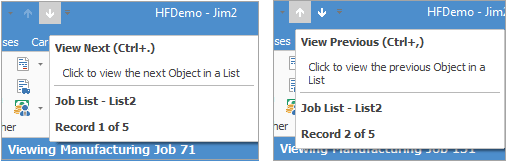
When viewing a contract from a list, click the arrow in the quick access toolbar for the next/previous contract in that list:
Shortcut keys:
Ctrl+. moves to the next object in the list
Ctrl+, Moves to the previous object in the list
|
If user security allows it, right click within the grid, select Export Data and save the list information as an XLSX file.
|
Within the State and Next Billed fields, text coloured red means that an action is required on that Project, ie. a billing job needs to be generated, etc.
Once billing has been performed, the text will revert to black, ready for the next billing due cycle.
Request Sent text is green to indicate that the request has been sent, otherwise the field will be blank.
|
|
|
|
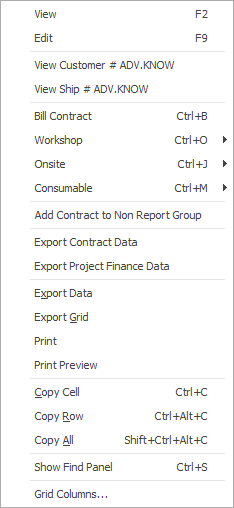
View
|
View the highlighted Project.
|
Edit
|
Edit the highlighted Project.
|
View Customer #
|
View the highlighted customer's cardfile
|
View Ship # Customer
|
View the highlighted customer's Ship cardfile
|
Bill Contract
|
Will allow billing the highlighted Project.
|
Consumable
|
This will allow you to choose the actions you have set up to create consumable jobs.
|
Onsite
|
This will allow you to choose the actions you have set up to create service jobs.
|
Workshop
|
This will allow you to choose the actions you have set up to create service jobs.
|
Add Contract to Non Report Group
|
Allows adding the highlighted Project.
|
Export Contract Data
|
Exports the list to a spreadsheet to allow changing information and importing back into Jim2.
|
Export Contract Finance Data
|
Exports the finance data to a spreadsheet.
|
Export Data
|
Exports the list to a spreadsheet.
|
Export Grid
|
Exports the grid to a spreadsheet. This is particularly useful if the grid has more than one header row, as it will export all header rows.
|
Print
|
Print the list.
|
Print Preview
|
Preview the list to be printed.
|
Copy Cell
|
Copy the highlighted cell.
|
Copy Row
|
Copy the highlighted row.
|
Copy All
|
Copy all, which can then be pasted into a spreadsheet
|
Show Find panel
|
Opens the Find panel:
|
The Find panel will remain in a pinned list but will disappear from an unpinned list on log off.
|
|
Grid Columns...
|
Allows adding more columns. Also allows removal of columns. Select the column to add, then drag it to the position required in the columns within the grid. To remove, click and drag to the Grid Columns... window, or drag down away from the header area.
|
|
|
After the top 3 (which are self explanatory), these options mirror what is on the ribbon in the Contracts tab, except for the last tab, which will Reset to Default all tabs.
|
Further information
Contract Security
Contract Header
Contract Reports
Finance Tab
Contract Footer Tabs
Contract Examples
Contract Variations
Add Child to Master Contract
Assets Swaps and Early Billing
Add a Document to a Contract
Change Bill Date on Contract
Change Customer on Contract
Copy Fields to Child Contract Explanation
Create Similar Contract
Finance Contracts
Terminate a Contract
Unlink a Child from a Master
|