Before commencing, check the current withholding tax rate with the Australian Taxation Office.
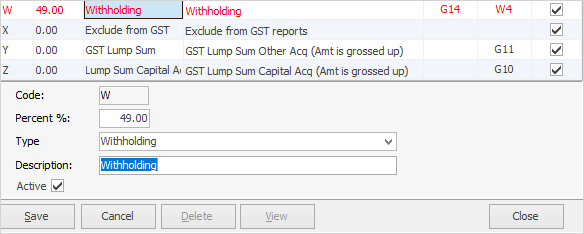
On the ribbon, go to Tools > Setups > Accounting > Tax Codes, and edit the tax rate as per advised, against the W withholding tax code.
Enter a purchase or expense order and use the W tax code as required. Jim2 will calculate the percentage of tax as per what is added against the tax code in setups.
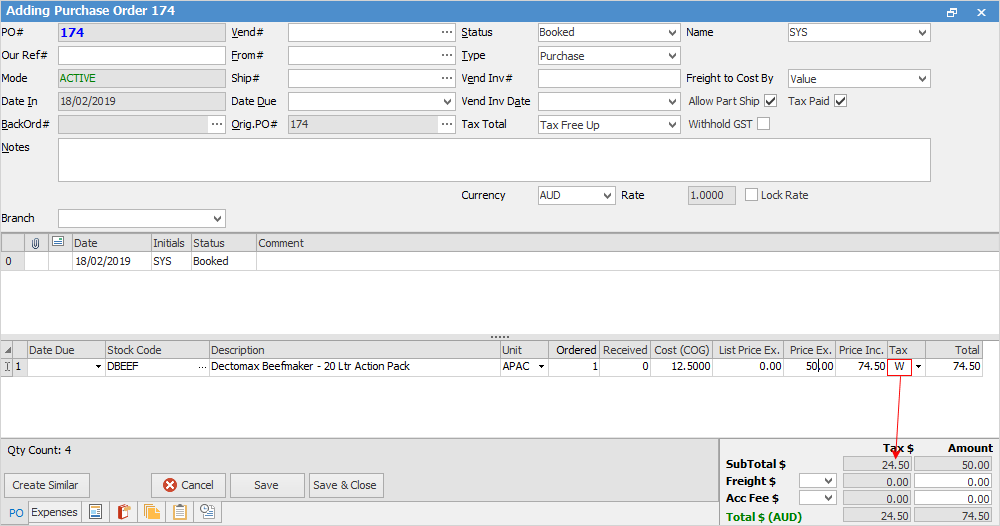
Original amount $50 plus 49% of that amount (24.50) = $74.50
The transaction will report in the GST Session under the Purchases tab. The transaction will appear in the By Tax tab indicating a W tax code.
However, these values do not flow through to the worksheet. Please adjust manually on the worksheet as required before reporting to the ATO.
They are not reported in W4, or any other field on the GST Calculation Worksheet for BAS.
Further information
Charge a Customer an Account Fee
Clear the Historical Balancing Account
Enter ATO Reportable Sub-Contractor Payments
Enter Capital into the Business
Enter Government Support Payments
Enter Prepaid Expenses and Amortising Costs
Remove Duplicate Payments in Closed Period
Share Utility Expenses with other Businesses
Suggested End Of Month Procedures
Understanding Debits and Credits
Variance in Trade Creditors and Creditor List Total