Add Multiple CardFiles

Back Top Prev Next Print
quality

This function is particularly useful to speed up the entry of multiple cardfiles when initially setting up Jim2, or there area number of cardfiles (also job, Item and stock) to enter.

1.On the ribbon, go to Tools > Options > General.

2.Tick CardFile in the Continuously adding in section.
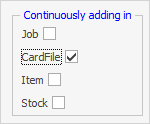
continuousadd

3.Click OK. The new setting will be saved, and the Options screen will close.


info

With this option ticked, once a cardfile has been entered and Save or Save & Close has been selected, a new Adding CardFile form will immediately open. Once all entries have been completed, click Cancel to close this new entry form. Go back into Tools > Options > General and untick Continuously Adding in, if required.


Further information

CardFile Security

User Security

CardFiles at a Glance

CardFile Header

CardFile Footer Tabs

CardFile List

Time Sheets

Timers and Labour

CardFile Contact Types

Auto Postcode/Suburb Lookup

CardFile Preview Pane

CardFile Reports

CardFile Types

Add a CardFile

Add Prospect CardFile

Add CardFiles to Groups

Add/Update Contact Details

Add/Update Customer Details

Add Customer-Specific Reports

Add Documents to CardFiles

Add Groups to a CardFile

Add Vendor Details

Add/Update User

Accountant Login

Browse for a CardFile

Bulk Update CardFiles with BPAY Ref

CardFile Merging & Deleting

Deactivate CardFiles

Email from CardFile List

Export a CardFile Report to Spreadsheet

Export Email Contact Report

Make Prepayments/Refunds

Quick Add CardFile

Reassign Users and Account Managers

Reassign Prior to Today

Set up Overseas Customer

Update Multiple CardFiles

View CardFile Transactions

View or Edit a CardFile