|
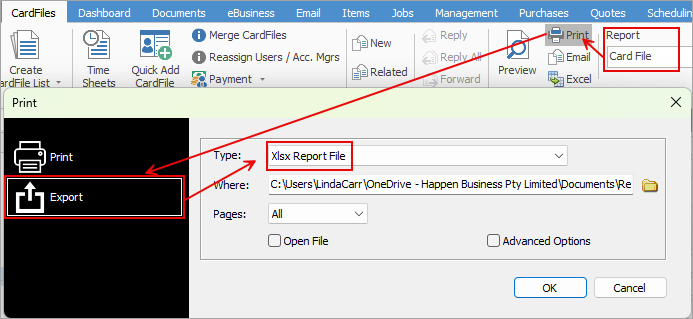
There are two ways you can export a cardfile report to a spreadsheet.
1.With the cardfile open, select the cardfile report in the ribbon, then select Print. In the Print dialog box, change to Export and select the Xlsx Report File in the Type field. This can then be saved locally.
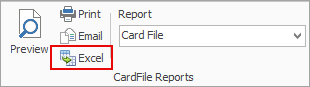
2.With the cardfile open, select the Job report in the ribbon, then select the Excel icon beside it. This will show each report pipeline in a separate sheet, ie. Cardfile, Contacts, etc.
You can use the Excel icon to produce reports directly to Excel. Permission for use of this is based on security since it accesses the report for the information.
Further information
Add a CardFile
Add a Time Sheet
Add an Accountant Login
Add Prospect CardFile
Add CardFiles to Groups
Add Customer-Specific Reports
Add Documents to CardFiles
Add Groups to a CardFile
Add Mulitple CardFiles
Add/Update Contact Details
Add/Update Customer Details
Add/Update User
Add Vendor Details
Auto Postcode/Suburb Lookup
Browse for a CardFile
Bulk Update CardFiles with BPAY Ref
CardFile Merging & Deleting
Create a CardFile List
Deactivate CardFiles
Edit a Time Sheet
Email from CardFile List
Export a CardFile List
Export Email Contact Report
Export Time Sheet Reports
Make Prepayments/Refunds
Quick Add CardFile
Reassign Users and Account Managers
Reassign Prior to Today
Set up Overseas Customer
Update Multiple CardFiles
Use CardFile List Results
View CardFile History
View CardFile Transactions
View or Edit a CardFile
|