|
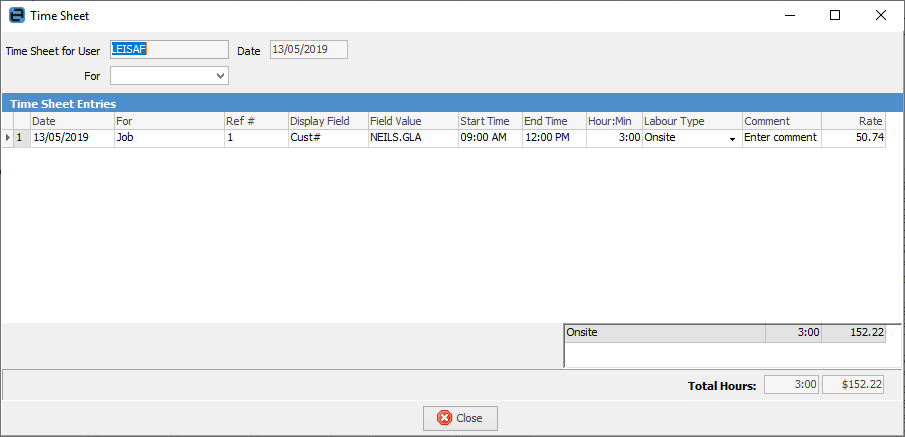
To edit an existing Jim2 time sheet:
1.Enter search criteria, then click Run.
2.From the list of results, select the user and labour date/time of the record to be edited.
3.Click Edit. The relevant time sheet will appear, which can be edited/updated as required.
To delete a line, highlight it and use Ctrl+Delete on the keyboard. This is also possible on a finished object.
|
|
These fields cannot be edited: Date, For, Ref #, Display Field, and Field Value. Lines cannot be deleted but they can be added.
|
Further information
Add a CardFile
Add a Time Sheet
Add an Accountant Login
Add Prospect CardFile
Add CardFiles to Groups
Add Customer-Specific Reports
Add Documents to CardFiles
Add Groups to a CardFile
Add Mulitple CardFiles
Add/Update Contact Details
Add/Update Customer Details
Add/Update User
Add Vendor Details
Auto Postcode/Suburb Lookup
Browse for a CardFile
Bulk Update CardFiles with BPAY Ref
CardFile Merging & Deleting
Create a CardFile List
Deactivate CardFiles
Email from CardFile List
Export a CardFile List
Export a CardFile Report to Spreadsheet
Export Email Contact Report
Export Time Sheet Reports
Make Prepayments/Refunds
Quick Add CardFile
Reassign Users and Account Managers
Reassign Prior to Today
Set up Overseas Customer
Update Multiple CardFiles
Use CardFile List Results
View CardFile History
View CardFile Transactions
View or Edit a CardFile
|