|
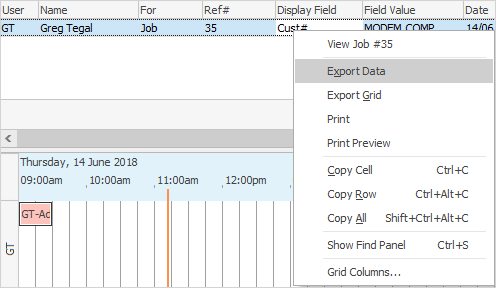
To export, print, or print preview a time sheet list, right click on the Time Sheet grid and select from the drop down options.
Print and Print Preview will generate a report on the fly, while Export Data creates a spreadsheet (.xls) file.
The original job, quote, purchase order, etc. of the line that is highlighted can also be viewed from the drop down options.
|
|
Time sheets are an excellent source of information to drive payroll. Simply create running jobs for internal hours like cleaning, research, lunch, etc. to allow allocation of a full eight hour day.
|
Further information
Add a CardFile
Add a Time Sheet
Add an Accountant Login
Add Prospect CardFile
Add CardFiles to Groups
Add Customer-Specific Reports
Add Documents to CardFiles
Add Groups to a CardFile
Add Mulitple CardFiles
Add/Update Contact Details
Add/Update Customer Details
Add/Update User
Add Vendor Details
Auto Postcode/Suburb Lookup
Browse for a CardFile
Bulk Update CardFiles with BPAY Ref
CardFile Merging & Deleting
Create a CardFile List
Deactivate CardFiles
Edit a Time Sheet
Email from CardFile List
Export a CardFile List
Export a CardFile Report to Spreadsheet
Export Email Contact Report
Make Prepayments/Refunds
Quick Add CardFile
Reassign Users and Account Managers
Reassign Prior to Today
Set up Overseas Customer
Update Multiple CardFiles
Use CardFile List Results
View CardFile History
View CardFile Transactions
View or Edit a CardFile
|