To add an amount to a finished purchase order at $0, add an expense order to the same vendor, using the same invoice number and invoice date.
In the grid, select a 5-XXXX account (it does not matter which account as the transaction won't report to it – it is just a mandatory field on expense orders).
In the purchase order field at the left, enter the incorrectly finished purchase order number – the expense order is linking back to the purchase order to update the COGS for the stock on that purchase order.
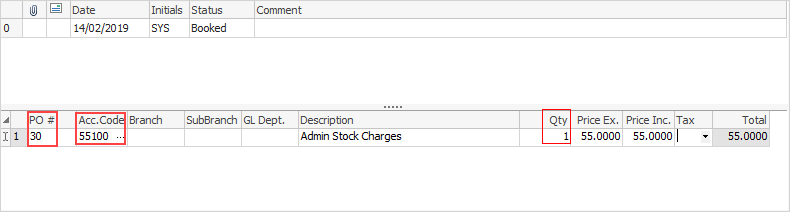
Enter quantity of 1 and the price.
|
Only one line and a quantity of one is required, as Jim2 does the rest. |

Finish and Save.
There is now an invoice owing in creditors, and the COGS field on the original purchase order will be populated instead of showing 0.
Further information
Add Comments to a Purchase/Expense Order
Add Freight to a Purchase Order
Enter Progress Payments on Purchase Orders
Export a Purchase Report to Spreadsheet
Fix Incorrect Pricing after PO Finished
Fix Incorrect Vendor on Purchase Order
Handle Employee Reimbursements
Handle a Credit for Freight Charged
Link a Job to a Purchase Order
Link Expenses to a Purchase Order
Print a Purchase/Expense Order
Record One Invoice Number on Multiple POs
Record Overseas Purchases, GST, Import Costs