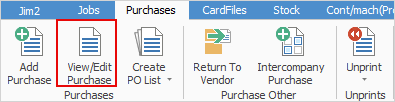
1.View or edit a purchase order by either:
▪Clicking View/Edit Purchase on the ribbon, or
▪Right clicking on Purchases in the Nav Tree and clicking View/Edit Purchase.
|
If purchase order number is not known, use the search features of the purchase list to find the purchase. To open the purchase in View mode, double click the purchase in the list. To edit that purchase, click Edit at the bottom of the Purchase Order form just opened, or highlight the purchase order in the list and click either View or Edit at the bottom of the list. |

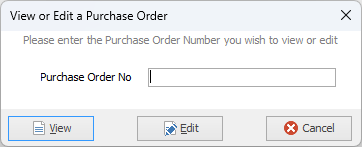
2.The above screen will appear and enter the purchase order number. Click either View or Edit, depending on what function to be performed.
|
Clicking Cancel will not cancel the purchase order selected – it will only cancel the choice to view or edit that purchase order. To cancel a Purchase order, edit that purchase order and apply the status of Cancel. Jim2 will time/date/initial stamp the cancellation, log the history of the cancellation and lock the purchase order from further edit. It will now only be available to view. |

While in View mode click Edit to make any changes. Both active and finished purchase orders can be viewed. Purchase orders on a status of Finish cannot be edited unless they are unprinted first.
Further information
Add an Amount to a PO when Finished at $0
Add Comments to a Purchase/Expense Order
Add Freight to a Purchase Order
Enter Progress Payments on Purchase Orders
Export a Purchase Report to Spreadsheet
Fix Incorrect Pricing after PO Finished
Fix Incorrect Vendor on Purchase Order
Handle Employee Reimbursements
Handle a Credit for Freight Charged
Link a Job to a Purchase Order
Link Expenses to a Purchase Order
Print a Purchase/Expense Order
Record One Invoice Number on Multiple POs
Record Overseas Purchases, GST, Import Costs