The stock on hand and cost of goods sold functions in Jim2 are extremely flexible and reliable for maintaining an accurate stock control system. A stock code will derive the last COG value from either the Vendors tab on the stock code or a purchase order, depending on which one was most recently updated
As there are different types of stock in Jim2, not all stock is treated in the same way when purchasing and selling.
As Labour and Applies types of stock cannot be purchased, they do not have any bearing on the stock on hand or the cost of goods sold. Depleting, special and non depleting can be purchased and therefore create general ledger entries.

When purchasing depleting and/or special stock, the purchase values will be entered into the stock on hand asset accounts for each stock record using the Stock GL Groups set up and added to each stock record. These Stock GL Groups will have a purchase (asset) account, a cost of goods sold (cogs) account and an income account for each group.
Special Stock covers stock where costs from the supplier will fluctuate. Special stock is also uniquely purchased for a specific job. The cost of goods will be taken across to the job when the stock is added, hence it uses the exact COGS rather than the last COGS. |
As non depleting stock is classed as stock not required to track quantities or values, when this stock is purchased the value goes straight into the cost of goods sold account as chosen in the Stock GL Group for that stock record – not a purchase asset account. This method of dealing with non depleting stock allows for keeping accurate stock on hand values within the general ledger and Jim2.
|

If an expense order is applied to a purchase order, it will disregard the general ledger account selected (select a general ledger account, as this is a mandatory field). It will use the expenses on purchases account, and from there be distributed to the correct stock on hand Stock GL Group accounts.
Once a purchase or expense order (whichever is last) is finished, the expense amount goes into the expenses on unfinished purchase orders account – then splits the expense into depleting, special and non depleting.
Depleting and special expense amounts go into the related asset purchase account(s).
Expense orders have no impact on journal stock, and the journal stock amounts will be ignored for the purposes of distributing COGS.
Non depleting expense amounts will be transferred to the non depleting cost of goods sold (COGS) account(s).
Once sold, the depleting and special COGS are transferred to the related COGS account for that stock. This is the COGS (price + expenses). |
Once a job is manufactured, it creates a purchase order on the status of Finish, which moves the raw material dollar values into the related stock on hand account for that manufactured stock. The COGS with Applies and Labour can display in the purchase order to use for pricing, but use Price (raw materials – depleting and special stock only) for COGS.
Once the product is sold and transferred from stock on hand, the price or price + expenses are moved into the related COGS account. |
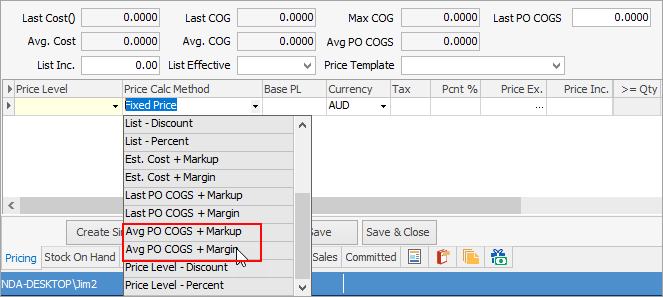
This stock pricing calculation method allows setting the selling price to be Average PO COGS + Markup or Average PO COGS + Margin.
The Average PO COGS changes only at point of purchase – not at point of selling as per the normal Avg COGS + Markup or Avg COGS + Margin methods.
This is strictly the average cost price paid for this stock, including on-costs/landed costs. Jim2 will recalculate this figure each time a purchase order is finished.
To understand how this works follow the example below:
|
Further information
Add an Amount to a PO when Finished at $0
Add Comments to a Purchase/Expense Order
Add Freight to a Purchase Order
Enter Progress Payments on Purchase Orders
Export a Purchase Report to Spreadsheet
Fix Incorrect Pricing after PO Finished
Fix Incorrect Vendor on Purchase Order
Handle Employee Reimbursements
Handle a Credit for Freight Charged
Link a Job to a Purchase Order
Link Expenses to a Purchase Order
Print a Purchase/Expense Order
Record One Invoice Number on Multiple POs
Record Overseas Purchases, GST, Import Costs