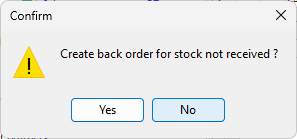
When receiving stock from a vendor, and the quantity supplied is lower than the quantity ordered, Jim2 will prompt as follows:
▪First, Jim2 will point out that some stock has a received quantity of 0 and ask if you would like to fix this.
▪Second, Jim2 will prompt to create a back order.
–Click Yes to create a back order. Jim2 will create the back order (another purchase order), showing the same information (it will not copy comments) as the original purchase order except that it blanks out the vendor invoice number and also adds the original purchase order number to the Orig.PO field. View the original purchase order by selecting the ellipsis [...] within this field. Any of the fields within this purchase order can be changed, as well as adding or removing any stock lines.
|
If stock is linked to a job but not received, the link will flow through to the new back order purchase order, and a new line will appear on the job linked to the back order. |

–If you select No, you cannot create a back order from the PO automatically any more.
If No is selected accidentally, just Create Similar on this PO and remove the stock with received quantities.
Further information
Add an Amount to a PO when Finished at $0
Add Comments to a Purchase/Expense Order
Add Freight to a Purchase Order
Enter Progress Payments on Purchase Orders
Export a Purchase Report to Spreadsheet
Fix Incorrect Pricing after PO Finished
Fix Incorrect Vendor on Purchase Order
Handle Employee Reimbursements
Handle a Credit for Freight Charged
Link a Job to a Purchase Order
Link Expenses to a Purchase Order
Print a Purchase/Expense Order
Record One Invoice Number on Multiple POs
Record Overseas Purchases, GST, Import Costs