When adding a large amount of stock to Jim2 in one session, set up a default option of continuously adding in, to speed up data entry.
To enable this default:
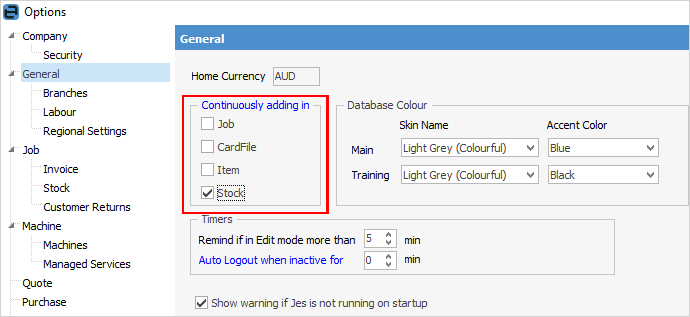
1.On the ribbon, go to Tools > Options > General
2.In the Continuously adding in area, tick Stock, then click OK at the bottom of the screen. The new option default will be saved, and the previously active screen will appear.
|
When finished entering all the details of a new stock record, click Save, or Save & Close and another Adding new Stock blank screen will open, ready for entering new data. |


Stock availability can automatically update when adding multiple stock. For example, when selecting multiple stock from the Stock Select screen, or when stock is added via changing a job’s Item.
This feature is enabled via Tools > Options > Job > Stock and ticking Auto update available Qty when Stock is added to grid.
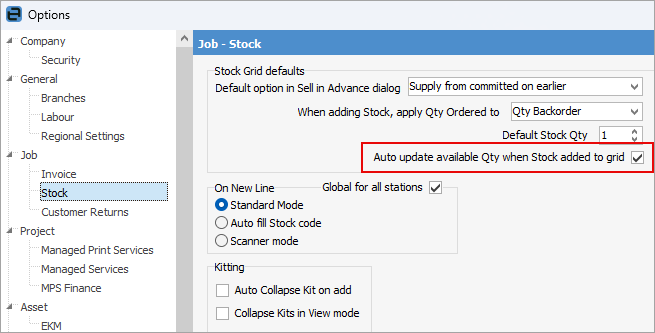
With this feature enabled, Jim2 will automatically update the supplied and back ordered quantities using the stock’s Stock in Advance setting (in the stock's Details tab).
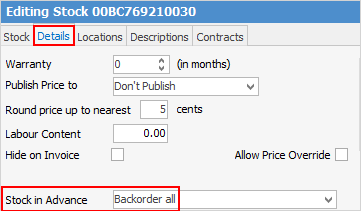
If Stock in Advance is not set, it will fall back to the default set in Options.
The row within a Job List will also be highlighted as per normal Stock Availability as follows:
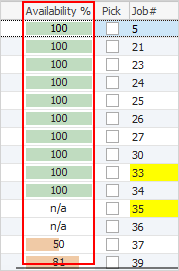 Green = 100% availability Orange = less than 100% availability Red – 0% availability |
Further information
Backfill Stock Sold in Advance
Buy and Sell in Different Measures
Change a Serial Number on a Stock Record
Export a Stock Report to Spreadsheet
Generate Backdated Stock on Hand Report
Move Stock from Depleting to Asset
Report Showing all Vendors on Stock
Stop Users From Giving Discounts
Update Existing Vendor Pricing