If stock has had no transactions against it, you can actually right click on that stock code in the grid and select Delete Current Stock:

Whilst there are no issues with marking stock as inactive when there is a quantity in stock (as this does not affect reporting), a warning will appear:
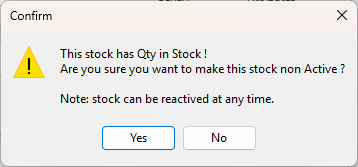
Normally, the stock would not be marked as inactive when there is a quantity in stock, however it is fine to do so.
Possible reasons for marking inactive:
▪New product but not for sale or purchase yet.
▪Old product that is in stock and needs to be written off.
▪It should not be available for selection, ie. product recall for example, and stock is in a quarantine location.
▪The product is still in stock, but just being flagged as inactive.
Consider unticking both the This Stock I Buy and This Stock I Sell, which is the basically the same as Inactive.
A report to use for auditing purposes is Stock Value By GL Group under Management > Reports in the Stock Reports folder. This report directly compares the stock sub ledger to the general ledger, and is a good way to check that no one is journalling directly to the SOH general ledger accounts.
In a perfect world this report should match to the cent, but is often out a few cents due to rounding (eg. I buy a pack of 3 things at $10 so 3.3333 each in SOH).
The Stock List by default only shows active stock, however if clicking in the Active checkbox twice to show a solid black box inside the checkbox will show both active and inactive.

Further information
Backfill Stock Sold in Advance
Buy and Sell in Different Measures
Change a Serial Number on a Stock Record
Export a Stock Report to Spreadsheet
Generate Backdated Stock on Hand Report
Move Stock from Depleting to Asset
Report Showing all Vendors on Stock
Stop Users From Giving Discounts
Update Existing Vendor Pricing