
Adding service stock is not very different to adding any other type of stock.
The only real difference from a stock record point of view is that This Stock I Service is ticked.
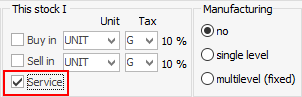
Ticking This Stock I Service will create a linked service Item with the same code as the stock record, or will link to an existing Item if the code is the same and it is set up as a service Item.
If an Item has the same code, but a different type, either change type or code on the Item, or untick This stock I Service for this stock.
Any stock required to service that particular Item is added in the Item record Stock tab (in the footer).

Further information
Backfill Stock Sold in Advance
Buy and Sell in Different Measures
Change a Serial Number on a Stock Record
Export a Stock Report to Spreadsheet
Generate Backdated Stock on Hand Report
Move Stock from Depleting to Asset
Report Showing all Vendors on Stock
Stop Users From Giving Discounts
Update Existing Vendor Pricing
Update Lead Time on Vendor Tab