Print Shelf Stalkers

Back Top Prev Next Print

There are two reports in Jim2 that will print shelf talkers (price stickers), both available from a Stock List only:

Stock List Shelf Talker No Price, which will produce a shelf talker without a price.

Stock List Shelf Talker PL1 (price level 1), which will produce a shelf talker with a price based on price level 1 in Jim2.
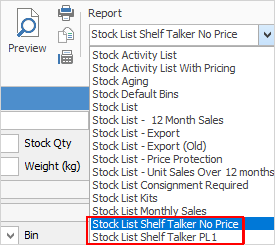
 

ShelfTalkerNoPrice


There are also two ways to produce these shelf talkers.

1.Create a Stock List based on a single stock code, select either of the Shelf Talker reports and this will produce one only, positioned in the top left corner of an A4 sheet.
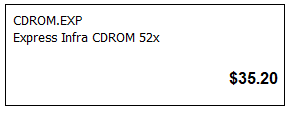
ShelfTalkerOneUp

2.Create a filtered Stock List, then select either of the Shelf Talker reports. This will produce 18-up stickers on A4 sheets of paper, ready to cut and use.
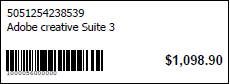
ShelfTalkerPl1


Further information

Stock Security

Consignment Stock

Consignment Stock for Customers

Kitting v Packaging v Manufacturing

Kitting

Packaging

Promotional Pricing

Stock Adjustments

Stock Attributes

Stock Flow

Stock List

Create a Stock List

Stock Preview Pane

Stock Pricing

Order of Pricing

Stock Procurement

Stock Reports

Stock Transfers

Stocktake

Tabs in the Footer

Tabs in the Header

Warehouse Management

Add Stock

Add Service Stock

Add a Document to Stock

Add Groups to Stock

Add Images to Stock

Add Multiple Stock Records

Add Vendor Codes

Backfill Stock Sold in Advance

Buy and Sell in Different Measures

Buying your own stock

Change a Serial Number on a Stock Record

Change Stock GL Group

Create Similar

Deactivate a Stock Code

Deactivate Stock in Bulk

Donations of Stock

Export a Stock Report to Spreadsheet

Generate Backdated Stock on Hand Report

Handle Warranty Stock

Import Vendor Pricing

Merge Stock Codes/Supersede

Move Stock from Depleting to Asset

Print Stock Reports

Sell Stock in Advance

Set up Pricing

Stop Users From Giving Discounts

Track Serial Numbers

Unallocate Stock

Update Existing Stock Pricing

Update Existing Vendor Pricing

Update Lead Time on Vendor Tab

Update Stock Procurement Data

Update Stock Records

Use Stock Select

Use Your Own Inventory

View or Edit Stock

Write off Stock

Use Gift Card for Purchases