There are two ways you can export a stock report to a spreadsheet.
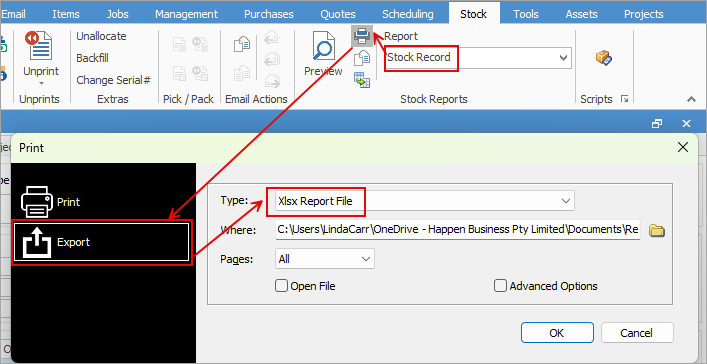
1.With the stock code open, select the appropriate report in the ribbon, then select Print. In the Print dialog box, change to Export and select the Xlsx Report File in the Type field. This can then be saved locally.
2.With the stock code open, select the appropriate report in the ribbon, then select the Excel icon beside it. This will show each report pipeline in a separate sheet, ie. Stock, Stock Price, Vendors, Bins, Attributes, etc.
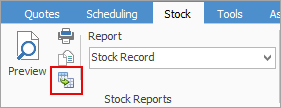
You can use the Excel icon to produce reports directly to Excel. Permission for use of this is based on security since it accesses the report for the information.
Further information
Backfill Stock Sold in Advance
Buy and Sell in Different Measures
Change a Serial Number on a Stock Record
Generate Backdated Stock on Hand Report
Move Stock from Depleting to Asset
Report Showing all Vendors on Stock
Stop Users From Giving Discounts
Update Existing Vendor Pricing