|
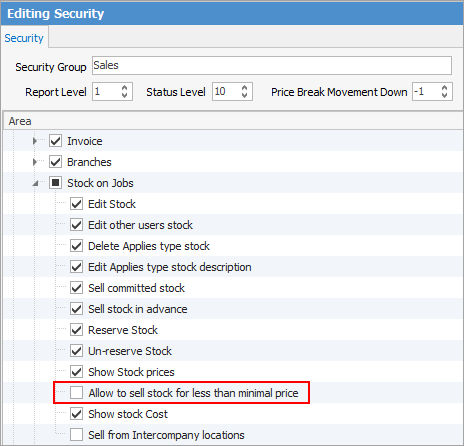
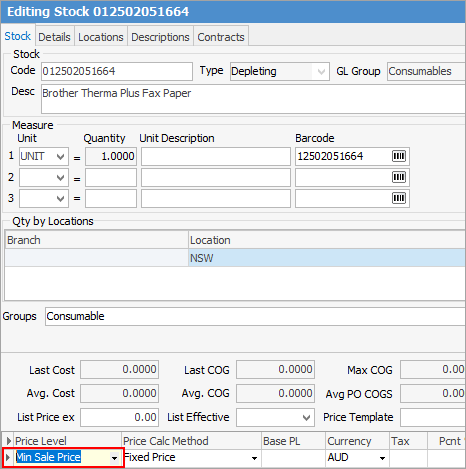
There are two steps to controlling how discounts can be applied by a user.
First, via Tools > Security > Jobs > Stock on Jobs, remove the tick from Allow to sell stock for less than minimum price.
The second step is to set a minimum price with Fixed Price as the Price Calc Method on the stock.
Further information
Add Stock
Add Service Stock
Add a Document to Stock
Add Groups to Stock
Add Images to Stock
Add Multiple Stock Records
Add Vendor Codes
Backfill Stock Sold in Advance
Buy and Sell in Different Measures
Buy your own stock
Change a Serial Number on a Stock Record
Change Stock GL Group
Create a Stock List
Create Similar
Deactivate a Stock Code
Deactivate Stock in Bulk
Export a Stock Report to Spreadsheet
Generate Backdated Stock on Hand Report
Handle Warranty Stock
Import Vendor Pricing
Make Donations of Stock
Merge Stock Codes/Supersede
Move Stock from Depleting to Asset
Print Shelf Talkers
Print Stock Reports
Report Showing all Vendors on Stock
Sell Stock in Advance
Set up Pricing
Track Serial Numbers
Unallocate Stock
Update Existing Stock Pricing
Update Existing Vendor Pricing
Update Lead Time on Vendor Tab
Update List Ex Pricing
Update Stock Procurement Data
Update Stock Records
Use Stock Select
Use Your Own Inventory
View or Edit Stock
Write off Stock
Use Gift Card for Purchases
|