
This is the heart of the accounting functionality in Jim2. From here, financial transactions can be queried and traced, accounts can be examined and adjustments made.
Jim2 is an accrual based accounting system. The only cash based reporting is for GST reporting.
|
Jim2 does not include a payroll calculation engine and therefore does not offer Single Touch Payroll reporting. If the entire general ledger is being maintained in Jim2, it is an easy task to move totals from the company's payroll software into Jim2 by way of general journals, and record the accumulations and liabilities of each payroll in the associated general ledger accounts for each payroll period. |

Jim2 does not have an automated depreciation function. It holds the value of fixed assets and any accumulated depreciation via the general ledger. In a typical Jim2 site, the depreciation entries are performed via a general journal. The detail of that journal is either from an external accountant or via a system or spreadsheet outside of Jim2.
The values held in the general ledger should conform to those from the external accountant, plus any movements in the year.
Accounts functions
|
▪Running a list of debtors ▪Viewing a debtor record and associated transactions ▪Moving between jobs/returns from customer/cardfiles and the debtor screen ▪Payment types and changing them ▪Receiving payments and prepayments ▪Sending payment receipts ▪Applying credits ▪Sending statements – from individual debtor and list ▪Debtors notes and setting up follow ups ▪Debtors adjustments – use with caution ▪Creating email templates and setting editor rules
▪Running a list of creditors ▪Viewing a creditor record and associated transactions ▪Moving between purchases/returns to vendor/cardfiles and creditors ▪Payment types ▪Making payments and prepayments ▪Sending remittances ▪Electronic payments ▪Creditors adjustments – use with caution
▪Status of Finish ▪Purchase orders ▪Consign buy orders ▪Expense orders |
▪Structure of the general ledger ▪Add a new account ▪Edit an account ▪Account types
▪Bank deposits/unbanked funds ▪Bank reconciliation
Spend Money transactions ▪Spend Money transactions ▪Cheque vs deposit ▪Status of Finish ▪Using the cheque book
▪Adding a payroll GJ
▪Cash/accrual, quarterly/monthly, IAS/BAS ▪Instalment income tax (provisional tax) ▪ATO clearing account if not paying in full |
Right click options in the Nav Tree
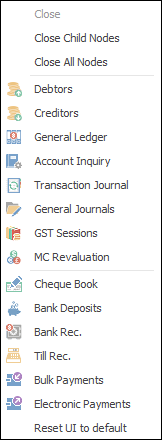
After the top 3 (which are self explanatory), these options mirror what is on the ribbon in the Accounts tab, except for the last tab, which will reset all tabs back to default.
Further information
Clear the Historical Balancing Account
Suggested End Of Month Procedures
Enter Government Support Payments
Purchase a Capital Asset Under Finance
Record Debtors/Creditors Contras
ATO Reportable Sub-Contractor Payments
Share Utility Expenses with other Businesses
Understanding Debits and Credits
Use Debtors and Creditors Adjustments