When editing a job and adding stock codes, quantities and pricing, Jim2 will indicate if there is insufficient quantity of stock to meet the job requirements.
As a job progresses, stock codes are included to ensure all stock, labour, tests and checks are included in the finished job. Once all the codes are entered, they can be supplied or back ordered, priced and invoiced. Where there is insufficient stock quantity available, Jim2 can then report this information and ask the user for a specific response. There is a process of purchasing to meet the back ordered stock quantity requirements.
|
There is a setting in Tools > Options > Stock > Serial/Attributes that allows you to run stock availability without attributes, if required. |

1.Open the required job in Edit mode.
2.Position the cursor in the Stock Code field, or use F4. To add a new line, use the down arrow or the Insert key on the keyboard.
3.Enter the applicable stock code.
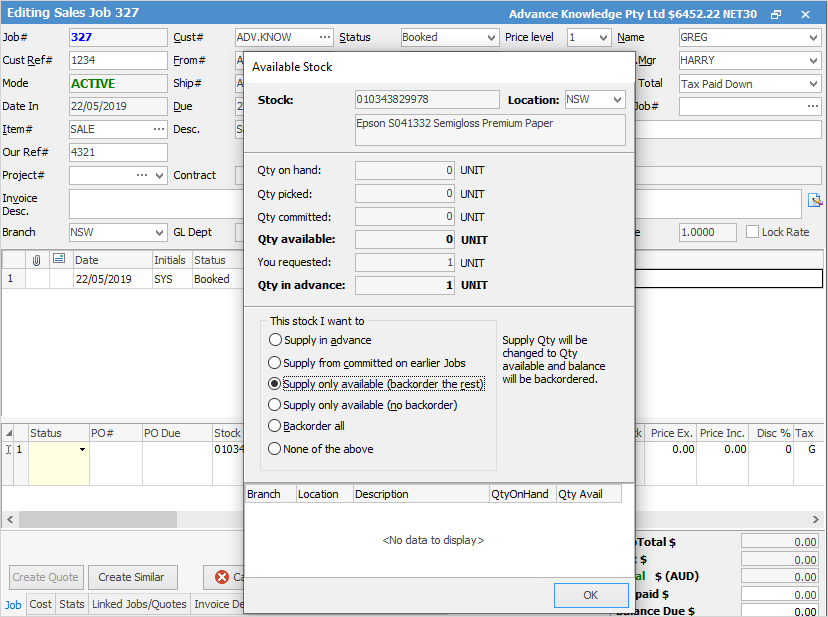
4.Use Enter or the Tab key to move along the stock grid. Jim2 will display a screen detailing available stock. It will provide options including supply in advance, supply from committed on earlier jobs, supply only available (back order the rest).
|
Set security to stop users from being able to supply in advance via Tools > Security > Jobs > Stock on Jobs, and untick Sell stock in advance. |
5.Select Supply Only Available (back order the rest). Use Enter.
6.If the quantity required by the customer is greater than 1, enter the quantity of the stock code required for the job. Use Enter.
7.If the quantity required of the stock code is not available, Jim2 will then display the screens as noted in point 4. Again, choose Supply Only Available (back order the rest).
8.Press Enter to move further along the stock grid.
9.Edit pricing as required.
10.Press Enter to continue to move which will lead eventually to a new line, and add required stock codes, quantities and pricing.
11.Click Save or use F9.
Further information
Auto Create Purchase Orders from Jobs
Charge Customer a Re-stocking Fee
Create a Job from a Similar or Previous Job
Create a Template for Recurring Jobs
Credit an Overcharged Customer
Export a Job Report to Spreadsheet
Export Labour Hours from a Job
Make Progress Payments and Claims
Select Serial Numbers on a Job
Stock Availability Allocation Process by List
Stock Availability by Location on the Fly