Once a Job List has been created, either fax, print or print preview the list via a variety of Job List reports. The devices available to produce that report will have been defaulted at a workstation level via Print Options.
Create a filtered Job List, select the Report toolbar drop down list and choose which Job List report style to use for the list.
 |
Jim2 is supplied with standard Job List reports suited to most businesses. Other Job List reports can be designed via Jim2 Report Designer. |
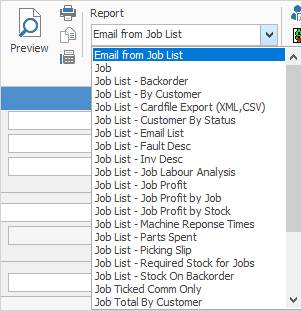
Once the Job List report has been chosen, select the print option to use – fax (if available), the available network printer(s), preview to screen, or print to file.
|
Reports available to print are context sensitive to which function is being accessed – if creating a list of jobs, the available reports are suited to Job Lists. |
Further information
Add Stock to Job When Insufficient Stock
Auto Create Purchase Orders from Jobs
Charge Customer a Re-stocking Fee
Create a Job from a Similar or Previous Job
Create a Template for Recurring Jobs
Credit an Overcharged Customer
Export a Job Report to Spreadsheet
Export Labour Hours from a Job
Make Progress Payments and Claims
Select Serial Numbers on a Job
Stock Availability Allocation Process by List
Stock Availability by Location on the Fly