Unprint a Job

Back Top Prev Next Print
UnprintJob


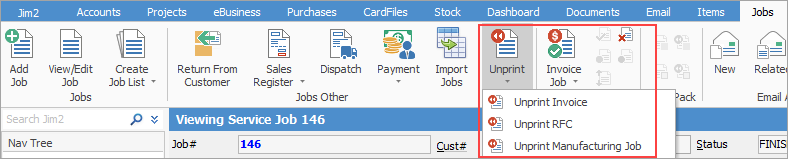
You are actually not unprinting a job, however you can unprint an invoice, a return from customer or a manufacturing job from within a job or job list.


Upon unprinting an invoice, the job will return to the READY state.


info

If you have a job with a backorder, rather than unprint the invoice, you should perform a return from customer instead.


Follow these links for information on how to perform an unprint:


Unprint an invoice

Unprint a return from customer

Unprint a manufacturing job


Further information

Jobs at a Glance

Jobs Security

Job List

Return From Customer

Sales Register

Dispatch

Hire Stock to a Customer

Job Comment Grid

Job Footer

Job Header

Job Status

Job Preview Pane

Job Reports

Job Stock Grid

Progress Payments and Claims

How Job status affects the GL

Add a Job

Add Billable Labour to a Job

Add Labour to a Job

Add Comments to a Job

Add a Document to Job

Add Discount to a Job

Add Freight to Jobs

Add Multiple Jobs

Add Stock By Multi Selection

Add Stock to a Job

Add Stock to Job When Insufficient Stock

Auto Create Purchase Orders from Jobs

Charge Customer a Re-stocking Fee

Create a Job from a Similar or Previous Job

Create a Template for Recurring Jobs

Create Back Order

Credit an Overcharged Customer

Email from a Job List

Export a Job Report  to Spreadsheet

Export Actual Labour

Export Labour Hours from a Job

Handle Part Delivery of Jobs

Job/Order Prepayments/Refunds

Import Jobs

Mark a Job as Ready

Print a Job

Reserve Stock for a Job

Scan Stock into Jobs

Select Serial Numbers on a Job

Stock Availability Allocation Process by List

Stock Availability by Location on the Fly

Take Deposits from Customers

Unallocate Stock From a Job

Unlink a Job

Unmark a Job as Ready

Unreserve Stock for a Job

Use Comments to Track Work in a Job

Use Stock Lookup and Select

View or Edit a Job