
View or edit a job by:
▪Pressing the F12 function key from anywhere and at any time, or
▪On the ribbon, go to Jobs> View/Edit Job on the ribbon, or
▪Right click on Jobs in the Nav Tree and select View/Edit Job.
|
If job number is not known, use the search features of the Job List in Jim2, to find the job. Double click the job to view/edit from the resulting list. This will bring the job into View mode only. To edit that Job, select Edit at the bottom of the job form. |

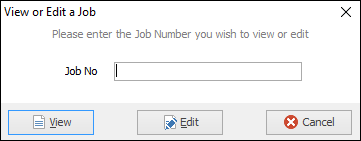
A screen will appear and enter the job number. Click either View or Edit, depending on what function to be performed.
|
Clicking Cancel will not cancel this job – it will only cancel the choice to edit it. |

|
Within the Job header, there is an Ex Job# field – indicating that the Item of this job has been processed previously. Selecting the job number in this field will open the record of that previous job. Cancelling the view of that previous job will go back to the job linked from.
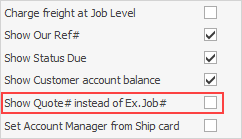
Note: Quote# instead of Ex Job# may be shown. What is seen here here is governed by what has been chosen in Tools >Options > Jobs.
 |
Further information
Add Stock to Job When Insufficient Stock
Auto Create Purchase Orders from Jobs
Charge Customer a Re-stocking Fee
Create a Job from a Similar or Previous Job
Create a Template for Recurring Jobs
Credit an Overcharged Customer
Export a Job Report to Spreadsheet
Export Labour Hours from a Job
Make Progress Payments and Claims
Select Serial Numbers on a Job
Stock Availability Allocation Process by List
Stock Availability by Location on the Fly